
From PageProof approval to MediaValet delivery – seamless.
A complete, connected creative workflow, bring clarity, speed, and confidence to every asset – from first review to final delivery inside MediaValet. Together, PageProof and MediaValet create a seamless bridge between your DAM and your review process, ensuring every asset moves through approval to DAM with total clarity.

See the PageProof & MediaValet integration
The missing link between approval and your DAM
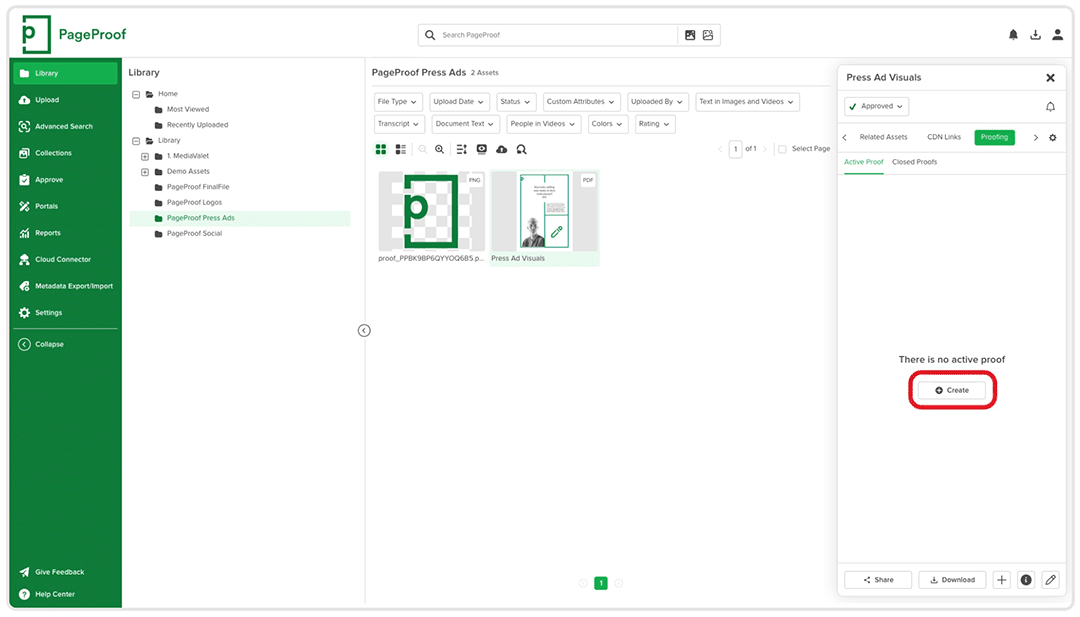
Create proofs directly from MediaValet
Powerful tools for faster, more confident approvals
Inside PageProof, reviewers can mark up any file type – from video and audio, through to high-res imagery and design files, to documents, PDFs, presentations and more. Built-in brand and compliance checks verify fonts, colors, links, barcodes, QR codes, and credentials for brand and compliance confidence.
A clearer path through revisions
Let’s grab a couple of details from you first

FinalFile Delivery: Approved assets returned automatically
Frequently asked questions
How do I integrate PageProof with MediaValet?
What proof data syncs automatically with MediaValet?
Can approved files be uploaded automatically to MediaValet?
Yes - when a proof is approved, the final file can be automatically uploaded into the relevant MediaValet folder using FinalFile Delivery. Simply add an “MV” or “MediaValet” tag to the workflow you’re using, or to the individual proof. Note: This is an Enterprise only feature.
What are the benefits of using PageProof with MediaValet?

Darren Gunton
General Manager Marketing
“We switched to PageProof and got 12x the functionality for 12x less cost.”

PageProof provided 12x the functionality for 12x less cost.

Matt Ivan
Senior Graphic Designer
“We spend half the time we used to, and have twice the output as our team did one year ago!”

PageProof doubled the output of the marketing team after 12 months.

Claire de Leon
Creative Manager
“Using PageProof and the monday.com integration sped up our workflow almost 40%.”

PageProof doubled the output of the marketing team after 12 months.
Seamless integrations
We make things easy for your team and your designers with integrations like these:


We support design, prototyping, and email marketing tools like these:


