PDF proofing software for faster reviews and approvals
Make every PDF review clear and actionable.
PDF markup and checklists for thorough reviews
Mark up PDFs effortlessly with PageProof’s intuitive online proofing tools. Draw markup, highlight text, add comments, attachments, and @mention other reviewers, with threaded feedback conversations and checklists to guide each review — all in one place. With feedback collected on a single proof, review stays clear and efficient for any team.
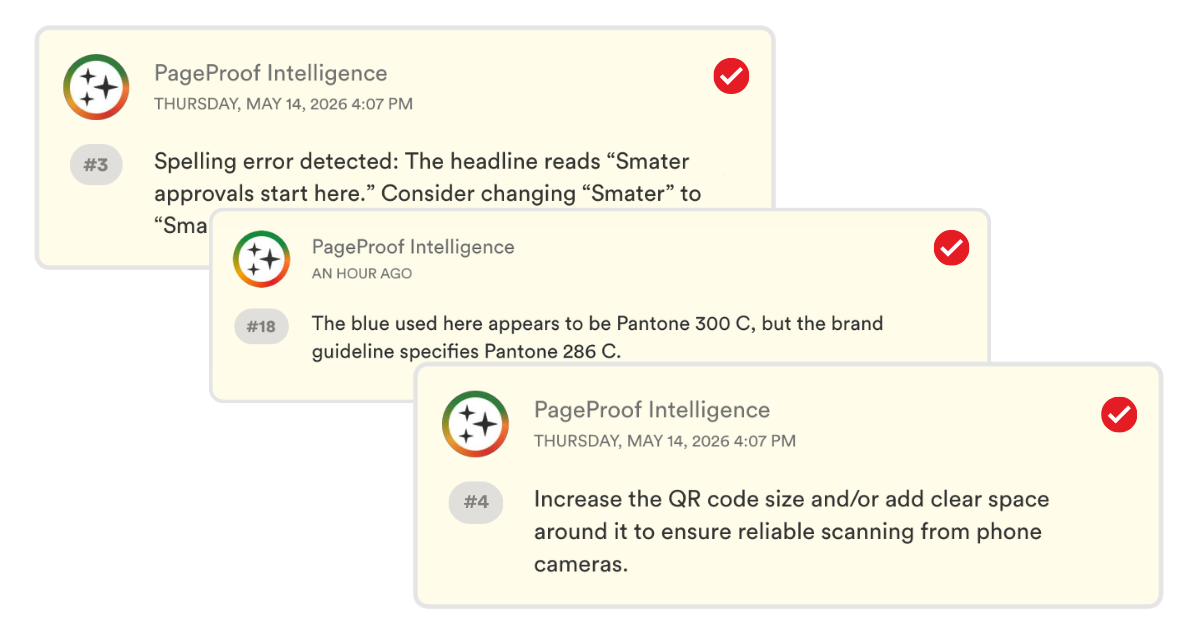
Intelligent proofing.
What if your proofing system could markup the proof up for you?
PageProof uses AI to analyze your creative and suggest markup directly on the proof — helping reviewers spot issues faster.
From spelling and layout checks to brand and production rules, AI helps guide reviewers to what needs attention so work moves to approval sooner.

It’s like having an extra set of expert eyes on every proof — easy as PI.
Keep every PDF moving.
Keep PDF approvals moving automatically
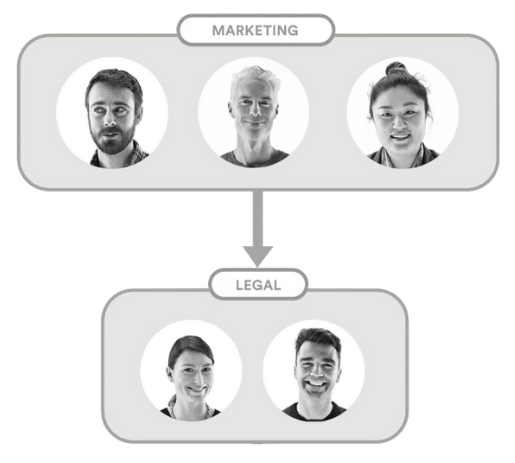
PageProof’s automated approval workflows guide PDF proofs through reviewers, helping feedback come together efficiently. Set up custom workflows, assign roles, and use automated reminders to keep reviews on track with less effort.
Bring every stakeholder into the review.
Review PDFs together, wherever teams are
PageProof brings stakeholders into one place to review the same PDF. Instead of feedback scattered across calls, emails, and handwritten notes, reviewers can mark up and comment on the proof at the same time — giving everyone a clear view of feedback and progress.
Enterprise-grade protection.
Secure PDF proofing for sensitive documents
PageProof protects your documents throughout the review process with patented triple-layer encryption, access controls, and comprehensive audit trails. Give teams a secure way to review sensitive PDFs while maintaining visibility over who accessed and approved each proof.
No feedback left behind.
Import comments from Adobe Acrobat PDFs
If you do receive an Adobe Acrobat PDF marked up with comments, you’ll love how easy it is to bring those comments directly onto your PageProof proof bringing everyone onto the same page.
It’s simple to save time and ensure accuracy in approvals in just a few clicks. Plus, all feedback is conveniently gathered in one place, making it a breeze to keep track of revisions.
Smart tools for every proof.
Powerful online proofing features

Checklists
For brand compliance, and to help guide reviewers during their review.

ColorSep®
Preview color separation plates, and check ink coverage.

Automated workflows
PDF proofs flow along without you lifting a finger.

Spell check
Spot typos on your proof, apply suggested corrections, and add words to your personal dictionary.

Smart compare
Side-by-side compare of versions, and smart compare will highlight the differences.

Barcode scanner
An automated scanner to check barcodes and QR codes.
Frequently asked questions
What is PDF markup software?
PDF markup software is a digital tool that enables users to annotate, comment on, and make edits to PDF documents electronically, facilitating collaboration and revision processes without the need for printing or physical markup tools.
How does PageProof simplify the PDF proofing process?
PageProof streamlines the proofing process by enabling quick sending of proofs for review and approval, facilitating efficient collaboration among team members.
What makes PageProof’s PDF proofing software powerful?
PageProof’s PDF proofing software streamlines the review and approval of PDF documents with intuitive markup tools, automated workflows, checklists to guide reviewers, and real-time collaboration — making document review both efficient and effortless.
Can I import comments from Acrobat PDFs into PageProof?
Yes — PageProof allows you to import comments and markup from Adobe Acrobat PDFs. This ensures all feedback, even if added outside the platform, is consolidated into your PageProof review environment.
What advanced features help ensure PDF accuracy?
PageProof offers smart PDF tools like checklists for brand compliance, ColorSep® for color separation plate previews, an automated barcode/QR scanner, side-by-side and smart compare to spot text or layout changes between versions, plus spell check and color check to catch errors before sign-off.